Page MenuHome GnuPG

Kleopatra: Make definition of custom keyboard shortcuts better configurable with keyboard only
Open, NormalPublic

Description

It seems that setting a custom keyboard shortcut is not possible without using a mouse. I could not find a key to open the "details" (marked in red below):
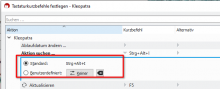
And even If I open these details with the mouse, I can't toggle from default to custom and then define the desired shortcut.

Details

Version
Gpg4win-5.0.0-beta345 VSD 3.3.2

Event Timeline

ebo triaged this task as Normal priority.Jul 29 2025, 3:31 PM
ebo created this task.
ebo mentioned this in Unknown Object (Maniphest Task).Oct 15 2025, 12:12 PM

The tab order is horrible, but with the right combination of Tab and Shift+Tab it is possible to set custom keyboard shortcuts and the remove them again.

Gpg4win 5 (Linux):

  • Open keyboard shortcut settings dialog
  • Press tab until the table gets the focus (first the buttons get the focus).
  • Use arrow keys to move to the action and the Shortcut or Alternate column you want to change. Press Space.

-> the UI with Default and Custom (marked in red) opens

  • Use Shift+Tab (!) to give focus to the UI element you want to change. (One can also use Tab, but you have to Tab a lot.)

Gpg4win 4 (Linux):
Same as above except that one has to use Shift+Tab to give focus to the table because with Tab the table never gets focus.

ok, then this ticket will be for improvement of the usability.

ebo renamed this task from Kleopatra: Make definition of custom keyboard shortcuts configurable with keyboard only to Kleopatra: Make definition of custom keyboard shortcuts better configurable with keyboard only .Tue, Dec 16, 9:26 AM