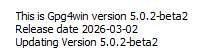
Restarting the installer after successful installation normally shows an "Updating" line in the first dialog:
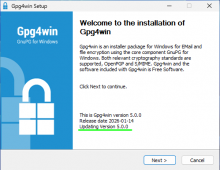
If the Browser integration component is installed, this line is omitted:
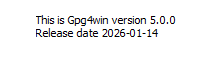
Restarting the installer after successful installation normally shows an "Updating" line in the first dialog:
If the Browser integration component is installed, this line is omitted:
gpg4win-5 has no idea that gpg4win-4 is installed because the former is a 64-bit installer/application and the latter a 32-bit installer/application, i.e. they use different registry trees. More important that the missing "Updating line" is very likely that the gpg4win-5 installer does not uninstall gpg4win-4. I haven't checked if NSIS is capable of detecting/uninstalling a 32-bit application from a 64-bit installer.
I overlooked that this ticket is about installing version 5 over version 5. In any case, the installer checks (or should check) if the registry entry Software\Microsoft\Windows\CurrentVersion\Uninstall\GPG4Win\DisplayVersion is set and, if yes, it shows "Updating Version <value of registry entry>". I don't see why it should matter what components are installed.
Is the above registry key set if the Browser integration component is installed?
Regarding 32-bit and 64-bit installers: The installer looks in both registry trees for the relevant registry keys, i.e. 64-bit over 32-bit and vice versa should properly uninstall the existing installation.
should properly uninstall the existing installation.
Yes, some days ago I also tested an upgrade from 4.4.1 with the 5.0.0 release and it worked fine.
I don't see why it should matter what components are installed.
I tested it with several component combinations and it only happens, if the browser integration is installed, not for all other ones.
Is the above registry key set if the Browser integration component is installed?
As soon as the browser integration is installed, the Computer\HKEY_LOCAL_MACHINE\SOFTWARE\Microsoft\Windows\CurrentVersion\Uninstall\Gpg4win key is missing. Without it, the key with all the fields is there.
I searched the whole registry and found, that if browser integration is installed, this key still lives in WOW6432Node: Computer\HKEY_LOCAL_MACHINE\SOFTWARE\WOW6432Node\Microsoft\Windows\CurrentVersion\Uninstall\Gpg4win
Thanks for checking! So now we know why the line is missing. Looks like installing browser integration causes a broken installation (at least with respect to registry keys).
Meh! The installation of the browser integration explicitly enables the 32-bit registry. Obviously a leftover from gpg4win 4.