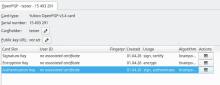
This issue can be seen in all tables, with both breeze styles (light and dark), but is most relevant in the smart card table where we have a column with an action button. The following is described for breeze light. The highlighted lines have exactly the same colors in Breeze dark, though.
When a line in a table gets focus, the whole line gets a blue background. When one then moves right or left with the arrow keys, no hint of focus position in the line is visible. This is probably due to the focus being shown as a blue line below a cell, which one can see when inserting a new card and then tabbing into the table:
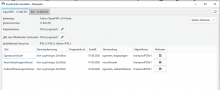
After pressing an arrow key, the background of the whole line turns blue and the font white. Then no single cell focus will be seen any more in this card window instance:
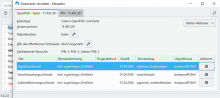
(Btw: if the public key is not there and the font is not bold, i find the white on blue text difficult to read.)
In VSD 3.3.6.1 (WIN10) a thin dotted line is shown around the focused cells. And here the highlighting of the line isn't as dark:
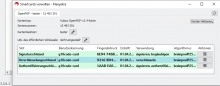
On VSD 3.3.6.1 (Linux AppImage), it looks mainly like on Windows 5.0.2, except that a faint line is shown when the focus is on the action button: