Kleopatra: Expired certificates not greyed out while loading card certificates
Closed, ResolvedPublic

Assigned To
Authored By
• ikloecker
Nov 27 2024, 5:14 PM

Description

How to reproduce:

  • You need a smartcard with expired certificates (e.g. an old NetKey v3 card)
  • Insert the card and open the smartcard window
  • Delete the certificates belonging to the first two card slots
  • Close the smartcard window and open it again
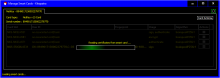
  • Kleopatra will load the card certificates and show a progress bar. It's hard to separate the progress overlay from the red certificates shown in the background.
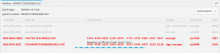
This is also mostly a cosmetic issue and only occurs if some certificates are loaded from the card while other expired certificates are already available. -> Low priority
Event Timeline

• ikloecker created this task.
• ikloecker moved this task from Backlog to WIP on the gpd5x board.
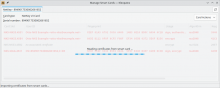
• ikloecker changed the task status from Open to Testing.Nov 28 2024, 4:14 PM

Fixed.

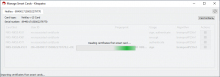
I also checked this on Windows 10 with light, dark and high contrast (theme No. 1) colors:


• ebo moved this task from WIP to Done on the gpd5x board.
• ebo added a subscriber: • ebo.

Confirmed with version 4.0.0.250370 (Gpg4win-5.0.0-beta145), I checked only the default light mode.