Page MenuHome GnuPG

Okular: Hang on signature with smime cert and distrusted root
Open, HighPublic

Description

Found by testing T7285: Okular: Improvement of error messages regarding signatures.

To reproduce:

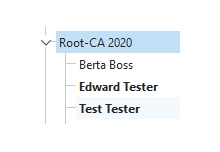
  1. Import testing root cert and some smime certs (e.g. edward)
  2. Distrust root cert in Kleopatra
  3. Open a pdf in Okular and add a signature with a smime cert (e.g. edward)
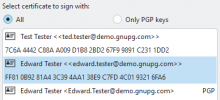
  4. Finish singing, save to file
    • No pinentry shows up
    • Okular hangs
    • The file is written
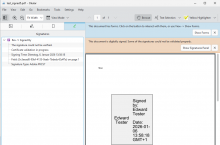
    • Opening the file, it shows: "The signature could not be verified"
Details

Version
gpg4win-5.0.0-beta479 @ win11

Event Timeline

timegrid created this object with edit policy "Contributor (Project)".

gpgsm.log (debug-all, whole process of signing)

If all processes are killed before okular is opened, i get an error on "finish signing":


On the second try, it hangs again.

Note: with trusted root cert, signing works fine.

Maybe it would be better to just not offer S/MIME certs with distrusted root cert?

How does gpgsm react if you try to sign with the certificate?

>gpgsm -v --sign --local-user "Edward Tester" test.pdf > test.gpg.p7s
gpgsm: enabled compatibility flags:
gpgsm: looking up issuer from the Dirmngr cache
gpgsm: number of matching certificates: 0
gpgsm: dirmngr cache-only key lookup failed: No data
gpgsm: issuer certificate {04A0A7E932B29D43A9B6673139AF52C0A5FC467BF5A64D044D1AC33613ABBB73CA532569F5779999114C0118CD66FDF6E92B1B0EEE2A4D5A815DA7FD892DDDE9C1} not found using authorityKeyIdentifier
gpgsm: looking up issuer from the Dirmngr cache
gpgsm: number of matching certificates: 0
gpgsm: dirmngr cache-only key lookup failed: No data
gpgsm: certificate is good
gpgsm: root certificate is not marked trusted
gpgsm: fingerprint=D4:EC:A6:B4:69:AB:B5:44:08:27:CB:3F:C7:D7:91:08:3C:10:27:DB
gpgsm: DBG: BEGIN Certificate 'issuer':
gpgsm: DBG:      serial: 01
gpgsm: DBG:   notBefore: 2020-03-26 19:41:01
gpgsm: DBG:    notAfter: 2063-04-05 17:00:00
gpgsm: DBG:      issuer: CN=Root-CA 2020,OU=GnuPG.com,O=g10 Code GmbH,C=DE
gpgsm: DBG:     subject: CN=Root-CA 2020,OU=GnuPG.com,O=g10 Code GmbH,C=DE
gpgsm: DBG:   hash algo: 1.2.840.113549.1.1.11
gpgsm: DBG:   SHA1 Fingerprint: D4:EC:A6:B4:69:AB:B5:44:08:27:CB:3F:C7:D7:91:08:3C:10:27:DB
gpgsm: DBG: END Certificate
gpgsm: after checking the fingerprint, you may want to add it manually to the list of trusted certificates.
gpgsm: validation model used: shell
gpgsm: can't sign using 'Edward Tester': Not trusted
[GNUPG:] FAILURE gpgsm-exit 50331649

>echo %ErrorLevel%
1
werner added a project: Bug Report.