When an error occurs during S/MIME file encryption the user should be offered a yes / no message box, which indicates that we can lower the security checks. Make it non VS-NfD compliant (in VS-NfD) mode and try again to encrypt with: GPGME_ENCRYPT_ALWAYS_TRUST.
Description
Description
Revisions and Commits
Revisions and Commits
| Status | Assigned | Task | ||
|---|---|---|---|---|
| Open | None | T8193 Add a workflow to force encryption/signature with invalid or expired certificates | ||
| Resolved | • ikloecker | T6702 Kleopatra: Offer retry of S/MIME encryption if encryption failed with "not trusted" | ||
| Resolved | • ebo | T6559 GPGSM: "always trust like override" or "force" option | ||
| Testing | None | T8221 gpgsm: emit more details when failing to check a crl from a crlDP |
Event Timeline
There are a very large number of changes, so older changes are hidden. Show Older Changes
Comment Actions
Maybe those smime certs will do:
- broken: inaccessible url crlDistributionPoints = URI:http://gnupg.test/crl.pem
- invalid: invalid content crlDistributionPoints = URI:https://gnupg.com/share/g10code-key.asc
In my tests, both have the same behavior:
- invalid after opening the details, so the cert can't be chosen for file encryption afterwards
- if chosen before invalidation, it hangs indefinitely on file encryption (will create another ticket for this)
Comment Actions
According to Werner, that should be:
It needs to be clarified which kind of errors should be handled and which kind of S/MIME certificates should be allowed to be used for encryption:
- Valid certificates where the CRL check (or OCSP check?) fails
- Invalid certificates (e.g. because of incomplete chain/missing CA)
- Expired certificates
Comment Actions
Ticket for the hang on file encryption: T8187: Kleopatra: File encryption with invalid S/MIME certificate hangs indefinitely
Comment Actions
@ebo and me talked about this and T6701: GpgOL: Use GPGME_ENCRYPT_ALWAYS_TRUST. We think, it's best to have a short meeting to discuss further changes.
There are currently two issues here (for both GpgOL and Kleopatra), which might have been mixed:
- Handling of errors (=broken CRL check for smime certs) with an easy way to "process anyway" (the original main issue of this ticket)
- A general wish to force the encryption for certain disallowed smime and pgp certs (expired, invalid, etc) (most important usecase: sending mails / encrypting files to recipients with temporarily expired cert or missing intermediate/root certs)
Issue 1)
- was implemented in GpgOL
- but doesn't seem to work (at least for my test certs), see T8190: GpgOL: Encrypt/Sign issues using S/MIME certs with invalid crlDP
- only for encryption, not signature (not clear to me, why not for both)
- should still be implemented in Kleopatra in the same way it works in GpgOL (on CRL error: Dialog to retry with lower security checks = force flag)
Issue 2) should be a new ticket and needs to be specified
- current state of offered certs in
- GpgOL (security dialog)
- "sign as": expired/revoked/disabled not offered, invalid forbidden
- "encrypt to": all offered, invalid/disabled/expired/revoked forbidden (ok button disabled)
- Kleopatra (tested with sign/encrypt file, probably the same for notepad/etc)
- all offered (tedious, but possible via "show certificate list"), invalid/disabled/expired/revoked forbidden (OK button disabled)
- GpgOL (security dialog)
- to enable a "process anyway (i know, what i'm doing)" workflow in both Kleopatra/GpgOL, i suggest
- on forbidden certs (probably only invalid/expired/disabled, not revoked?) add a checkbox ~"lower security" (with more explanation in the tooltip) next to the disabled OK button, which reenables the OK button and adds the "force" flag (also possible for pgp?)
- maybe an additional warning/confirmation dialog, if the checkbox was checked
- add a registry setting to disable this checkbox (as some admins might not want to enable their users to do this)
- Kleopatra
- maybe readd those forbidden certs to the default dropdown list (or keep that way as incentive to fix the problem)
- maybe only add the checkbox for smime certs, if that's easier (as pgp certs can be easily extended)
- GpgOL
- add the forbidden certs to "sign as" as well (probably the sender also wants to force this temporarily)
- ensure, that the security dialog is shown, if a forbidden cert is chosen (probably already works that way?)
Comment Actions
Issue 1) should be implemented as already described (on error -> dialog to retry with "always trust" flag)
Issue 2) moved to new issue T8193: Add a workflow to force encryption/signature with invalid or expired certificates
Comment Actions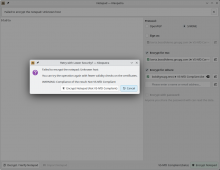
Current implementation for the case of an S/MIME certificate which turns out to be invalid when it's used for encryption. Is that what we want?

Possible improvements:
- The "Encrypt Notepad (Not VS-NfD Compliant)" button should probably be red like the action button of the notepad if an invalid certificate is selected.
- Show better error than "unknown host", i.e. something like "CRL check failed" or "Certificate validity check failed", but I'm not sure we get better information from gpgsm.
Feel free to suggest better texts, etc.
Comment Actions
yes, basically it's what we want.
But the error message is really, really awful. From your suggestions I'd prefer the first one, "CRL check failed".
Maybe @pl13 can have a look at what info gpgsm can give us?
Regarding the button: yes, red for consistency would be good.
And shouldn't the certificate change from green check mark to red X after the CRL check, too? Or maybe now a blue ! because we now allow the encryption with caveats?
Comment Actions
Ideally the certificate would change, but Kleopatra has no idea that this certificate turned out to be not valid. In fact, Kleopatra doesn't even know that the encryption failed because of some certificate. It could have failed for any other reason (e.g. full disk). Kleopatra only knows that an error occurred and offers to retry with lower security. (I looked at GpgOL and it does the same.)
Hmm, maybe Kleopatra could get some info from the encryption result. It seems to have a list of invalid recipients.
Comment Actions
I tried to add the list of invalid recipients to the message box, but it seems that gpgsm stops the validation of the certificates at the first invalid recipient. I got only the first Bob certificate reported as invalid recipient when I tried to encrypt to both Bob certificates so that it doesn't make sense to list the (incomplete) list of invalid recipients. It also means that Kleopatra cannot update the invalid recipient certificates because it knows only of one invalid certificate.
We could validate the recipient certificates the user has chosen in the background (before they click "Encrypt"), but that's a different story.
The best option seems to be to replace the first line with the not-very-helpful error message with something like this: "Failed to encrypt the notepad because some certificates could not be validated."
Comment Actions
Your suggestion sounds ok to me, maybe with a slight change for the message: "Failed to encrypt the notepad because at least on certificate could not be validated."
Do I understand it correctly that you found out how you can get the info that validation failed? So that you can in fact differentiate between invalid certificate and e.g. full disk?
Comment Actions
Maybe. EncryptionResult has a list of invalid recipients and I've changed the code to show the Retry dialog only if there's at least one invalid recipient.
Comment Actions
Implemented for the Notepad and Sign/Encrypt Files. Can be tested with the certificates in T6702#216065.
I have not (yet) implemented it for the clipboard and if really needed I'd prefer a separate ticket for this.
When I tried to test my changes by S/MIME encrypting two files as encrypted archive I got an "input/output error" instead of an encryption result with invalid certificates. I've create a separate ticket for this since this problem is unrelated to my changes: T8234: Kleopatra: On Linux, creating S/MIME encrypted archive of multiple files for certificate with bad CRL fails with input/output error
Separately encrypting multiple files with S/MIME certificates and OpenPGP certificates worked. One might have to answer Overwrite questions multiple times, but I think that's acceptable. Since S/MIME encryption and OpenPGP encryption are performed in parallel the OpenPGP encryption finishes successfully while the S/MIME encryption fails and asks for a retry without certificate validation. Since simultaneous S/MIME and OpenPGP encryption isn't the norm I'd prefer not to spend time to avoid doing the OpenPGP encryption (which already succeeded on the first attempt) twice.
Comment Actions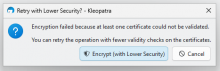
Looks good to me on gpg4win-5.1.0-beta646 @ win11:

Note:
- On gpg4win, the button is not red - that's ok?
- Decryption does not work with the test certs (invalid crypto engine), but this issue was only about encryption, so i guess this is fine
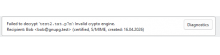

For both test certificates and both notepad and file encryption:
- dialog is shown
- encryption works (at least it finishes successfully)
Comment Actions
red/green buttons are used exclusively for de-vs compliance which doesn't exist outside of VSD.
- Decryption does not work with the test certs (invalid crypto engine), but this issue was only about encryption, so i guess this is fine
Yes, that's a separate issue. Not sure where the weird error message comes from.
Comment Actions
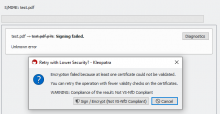
Tested with vsd-3.4.0-beta1326 @ win10
Issues found:
- The "Encrypt (with Lower Security)" button is also not red on vsd

Done:
- Encryption works
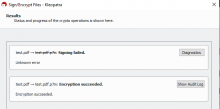

Notes:
- Decryption also fails, the recipient key is still displayed as VS-NfD Compliant (also in the key list). Not sure if this is fine:
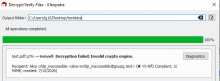

Comment Actions
The issue of the missing red button seems to be a general problem and is split into T8407: Kleopatra: Button background color for VS-NfD operations is gray instead of green/red
