Page MenuHome GnuPG

Kleopatra: Status in certificate list not updated after import
Open, NormalPublic

Description

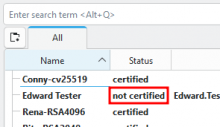
In gpg4win-5.0.0-beta479: On import of one or more secret certs and after confirmation of ownership, the status of the imported certs will be "not certified". A refresh will resolve this.

To reproduce:

  1. Import one or more secret cert, e.g. Edward_Tester_0xB5297489_SECRET.asc
  2. Confirm ownership -> Status of imported certs in certificate list is "not certified"
  3. Refresh the certificate list via F5 -> Status in certificate list is "certified"
Details

Version
gpg4win-5.0.0-beta479 @ win11

Event Timeline

timegrid created this object with edit policy "Contributor (Project)".

Please attach the log output of Kleopatra

Also: What happens if you cancel the ownership question and then change the owner trust of the key on the command line?

I cannot reproduce this on Linux. Here I see that the file system watcher notices that trustdb.gpg was changed and triggers a keylisting.

Interesting. I also wasn't able to reproduce this anymore, although I even created a new VM to make sure this is reproducible in a clean setup (and it was reproducible every time).
After restart of windows, it is reproducible again. This is the debugview output for an import without status update:

1	0.000000	9112	kleopatra.exe	org.kde.pim.kleopatra: 
2	0.293200	9112	kleopatra.exe	org.kde.pim.kleopatra: 
3	0.316561	9112	kleopatra.exe	org.kde.pim.libkleo: Classified based on content as: 770
4	0.316790	9112	kleopatra.exe	org.kde.pim.kleopatra: 0x26fc8183bc0
5	0.316843	9112	kleopatra.exe	org.kde.pim.kleopatra: open_or_raise raising window
6	0.386132	9112	kleopatra.exe	org.kde.pim.kleopatra: No update for: "5.0.0-beta479"
7	0.389818	9112	kleopatra.exe	org.kde.pim.libkleo: KeyCacheAutoRefreshSuspension
8	0.392923	9112	kleopatra.exe	org.kde.pim.kleopatra: increaseProgressMaximum progress: 0 / 2
9	0.393006	9112	kleopatra.exe	org.kde.pim.kleopatra: increaseProgressMaximum progress: 0 / 3
10	0.393051	9112	kleopatra.exe	org.kde.pim.kleopatra: increaseProgressMaximum progress: 0 / 4
11	0.393163	9112	kleopatra.exe	org.kde.pim.kleopatra: Kleo::ImportCertificateFromFileCommand(0x26fc8183bc0) tryToFinish
12	0.393213	9112	kleopatra.exe	org.kde.pim.kleopatra: Kleo::ImportCertificateFromFileCommand(0x26fc8183bc0) tryToFinish There are pending jobs -> start the next one
13	0.503505	9112	kleopatra.exe	org.kde.pim.kleopatra: Kleo::ImportCertificateFromFileCommand(0x26fc8183bc0) onImportResult QGpgME::QGpgMEImportJob(0x26fc80dac30)
14	0.503746	9112	kleopatra.exe	org.kde.pim.kleopatra: increaseProgressValue progress: 1 / 4
15	0.503913	9112	kleopatra.exe	org.kde.pim.libkleo: errorAsString gettext_use_utf8(-1) returns 1
16	0.503960	9112	kleopatra.exe	org.kde.pim.libkleo: errorAsString error: "Success"
17	0.504081	9112	kleopatra.exe	org.kde.pim.libkleo: errorAsString error (percent-encoded): "Success"
18	0.504142	9112	kleopatra.exe	org.kde.pim.kleopatra: Kleo::ImportCertificateFromFileCommand(0x26fc8183bc0) addImportResult "C:/Users/g10/Desktop/certs/testzertifikate_2023/Ted_Tester_0x005F36A4_SECRET.asc" Result: "Success"
19	0.504196	9112	kleopatra.exe	org.kde.pim.kleopatra: Kleo::ImportCertificateFromFileCommand(0x26fc8183bc0) tryToFinish
20	0.504508	9112	kleopatra.exe	org.kde.pim.kleopatra: Kleo::ImportCertificateFromFileCommand(0x26fc8183bc0) tryToFinish There are pending jobs -> start the next one
21	0.590904	9112	kleopatra.exe	org.kde.pim.kleopatra: Kleo::ImportCertificateFromFileCommand(0x26fc8183bc0) onImportResult QGpgME::QGpgMEImportJob(0x26fc80de2d0)
22	0.590989	9112	kleopatra.exe	org.kde.pim.kleopatra: increaseProgressValue progress: 2 / 4
23	0.591072	9112	kleopatra.exe	org.kde.pim.libkleo: errorAsString gettext_use_utf8(-1) returns 1
24	0.591122	9112	kleopatra.exe	org.kde.pim.libkleo: errorAsString error: "End of file"
25	0.591237	9112	kleopatra.exe	org.kde.pim.libkleo: errorAsString error (percent-encoded): "End%20of%20file"
26	0.591315	9112	kleopatra.exe	org.kde.pim.kleopatra: Kleo::ImportCertificateFromFileCommand(0x26fc8183bc0) addImportResult "C:/Users/g10/Desktop/certs/testzertifikate_2023/Ted_Tester_0x005F36A4_SECRET.asc" Result: "End of file"
27	0.591356	9112	kleopatra.exe	org.kde.pim.kleopatra: Kleo::ImportCertificateFromFileCommand(0x26fc8183bc0) tryToFinish
28	0.591415	9112	kleopatra.exe	org.kde.pim.libkleo: Kleo::KeyCache(0x26fc5873ae0) reload option: 0
29	0.591476	9112	kleopatra.exe	org.kde.pim.libkleo: KeyCache::RefreshKeysJob start
30	0.721922	9112	kleopatra.exe	org.kde.pim.libkleo: Kleo::KeyCache::RefreshKeysJob(0x26fc7fe0240) RefreshKeysJob::done
31	0.722704	9112	kleopatra.exe	org.kde.pim.libkleo: readGroups Reading groups
32	0.723839	9112	kleopatra.exe	org.kde.pim.kleopatra: Kleo::ImportCertificateFromFileCommand(0x26fc8183bc0) keyCacheUpdated
33	0.723962	9112	kleopatra.exe	org.kde.pim.libkleo: ~KeyCacheAutoRefreshSuspension
34	0.724079	9112	kleopatra.exe	org.kde.pim.kleopatra: importGroups Importing groups from file "C:/Users/g10/Desktop/certs/testzertifikate_2023/Ted_Tester_0x005F36A4_SECRET.asc"
35	0.724676	9112	kleopatra.exe	org.kde.pim.kleopatra: increaseProgressValue progress: 3 / 4
36	0.725641	9112	kleopatra.exe	org.kde.pim.kleopatra: setProgressToMaximum
37	0.829792	9112	kleopatra.exe	kf.i18n.kuit: "Tag 'numid' is not defined in message {<__kuit_internal_top__><para>You have imported a certificate with fingerprint</p...}."
38	2.322981	9112	kleopatra.exe	org.kde.pim.kleopatra: handleOwnerTrust Skipping import for already handled fingerprint
39	2.323359	9112	kleopatra.exe	org.kde.pim.kleopatra: handleOwnerTrust Skipping non-OpenPGP import
40	2.347135	9112	kleopatra.exe	org.kde.pim.kleopatra: Failed to find treeview
41	2.347681	9112	kleopatra.exe	org.kde.pim.kleopatra: 0x26fc8183bc0
42	2.349349	9112	kleopatra.exe	org.kde.pim.kleopatra: Kleo::Command(0x26fc8183bc0) ~Command
43	2.349517	9112	kleopatra.exe	org.kde.pim.kleopatra: Kleo::Command(0x26fc8183bc0) ~Private
44	2.349565	9112	kleopatra.exe	org.kde.pim.kleopatra: 0x26fc8183bc0

Also: What happens if you cancel the ownership question and then change the owner trust of the key on the command line?

after gpg --lsign berta, the status value in kleopatra was updated automatically.

after attaching a smartcard reader with a smartcard, i can't reproduce this issue anymore

Other observations:

  • after removing the smartcard reader again it's still not reproducible
  • after win restart it's not always reproducible
  • best chances to reproduce by killing all gpg related processes and deleting gnupghome and Gpg4Win folders first, then import

Also: What happens if you cancel the ownership question and then change the owner trust of the key on the command line?

after gpg --lsign berta, the status value in kleopatra was updated automatically.

Why "berta"? Anyway, I was more thinking about gpg --edit-key edward and then trust ... Signing doesn't change the owner trust.

Do you click "Yes, it's mine" really quick? Maybe the file system watcher doesn't notice that the timestamp of the trustdb.gpg file changed. MS DOS used to have a two second granularity for timestamps of files.

Why "berta"?

The imported cert was berta`s in this case.

gpg --edit-key edward and then trust

This does not trigger a refresh. After a manual refresh, the status is "certified" then.

Signing doesn't change the owner trust.

After --lsign the status changed from "not certifed" (ownership question cancelled previously) to "certified" though, automatic refresh is working.

Do you click "Yes, it's mine" really quick?

Waiting ~10s before confirming the ownership does not change the behaviour, the imported cert still is "not certified"

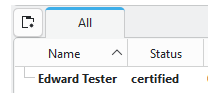
to make sure we talk about the same thing, it's about the status column:

Ebo was also able to reproduce it like this:

  1. Kill all processes (maybe the leftover socket files do interfere): taskkill /IM "keyboxd.exe" /IM "gpg-agent.exe" /IM "okular.exe" /IM "dirmngr.exe" /IM "gpgsm.exe" /IM "kleopatra.exe" /F 1>nul 2>&1
  2. Delete Roaming\gnupg and Roaming\Gpg4win folders
  3. Open Kleopatra, import a secret pgp key, confirm ownership -> status is "not certified" (this is repeatable, each new imported cert is displayed as "not certified" until manual refresh)

Okay. Confirmed and understood. The problem is that file system watcher doesn't watch the trustdb.gpg file because the file did not yet exist when the watcher was initialized. And during the import we disable the file system watcher so that it doesn't notice the creation of the file and therefore doesn't start watching it.

Conclusion: This only happens on fresh installations, but there it will happen every time a user imports their secret key as first operation.

werner triaged this task as Normal priority.Fri, Jan 9, 10:56 AM