Page MenuHome GnuPG

Upgrade of local (portable) installation failed
Closed, InvalidPublic

Description

I had gpg4win 4.4.1 installed as non-privileged installation (somewhere in %APPDATA%).
When upgrading to 5.0.1 the uninstall of the previous version seemed successful, but installation of the new version failed with:
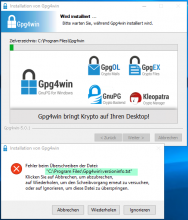
So it seems the upgrade tried to use the non-portabler path "program files" instead of "appdata". And the directory "C:\Program Files\Gpg4win" does not even exist.
Details

Version
5.0.1

Event Timeline

Also: When I click "Abort" ("Abbrechen"), the dialog disappeared, but the main windows does not show any progress: Specifically it does not abort.
I had to press "Abort" ("Abbrechen") in the main window; then the upgrade aborted.
When retrying (and confirming that I don't want to install as Administrator (actually I cannot)), the proposed target directory still is "C:\Program Files\Gpg4win".
When locating the previous installation directory (it seems it was a subdirectory of %USERPROFIL%\Downloads) the upgrade succeeded, but Kleopatra fails to start.
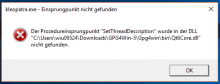
It wants a bin\Qt6Core.dll, but in the bin directory there is only a Qt5Corew.dll dated " 14. ‎Juli ‎2023, ‏‎13:23:40".
When retrying the installation/upgrade it announced to upgrade 5.0.1, but then did seemingly nothing (I guess as the version was estimated to "be current" already).
It seems some "reinstall/repair" option is missing.

When installing to a completely new directory, installation succeeds, but starting Kleopatra fails with this new error (Qt6Core.dll exists this time):

I'm surprised that nobody did detect these problems during the long beta phase...

For the time being I "upgraded 5.0.1 to 4.4.1 (in the new directory), and then Kleopatra started again.
When upgrading that installation again to 5.0.1, Kleopatra does not start (same error message as before).

Please do not use the portable installation - it is dangerous to use it. We will eventually remove this option.

Regarding your problem: You need to use a current Windows version (and not Windows Server 2016) or wait for the next Gpg4win release were we might be able to backport a fix in the Qt Libraries.

I'm surprised that nobody did detect these problems during the long beta phase...

I guess that those who try beta versions are also using up-to-date Windows versions and not Windows server.
I close this report because T8100 was the first to report this.

You need to use a current Windows version (and not Windows Server 2016)

At least the product still has (limited) support.